Curiate Blog
Why can't I stop scrolling? The science and history of endless feeds
How a shortcut for browsing became a feed without a finish line
You opened the app to check one thing. You have now watched a stranger restore a chair, read an argument you never intended to join and forgotten what you came for.
Scrolling can be hard to stop because continuing takes almost no effort, the next item might be rewarding, and recommendations keep supplying possibilities. Repeated checking can also become a habit. These processes can work together, but they are different problems—and changing one may help more than simply promising to spend less time online.
The history is revealing: some early versions of infinite scroll were designed to help people find information efficiently. The same convenience can keep a browsing session going long after its original purpose has ended.
Infinite scroll, recommendations and autoplay are different things
Infinite scroll loads more material as you approach the bottom of a page. You do not have to click “next page.” A finite list can use similar technology and still end.
Recommendations decide which items to show. They can supply material beyond the accounts or topics you explicitly chose.
Autoplay starts media without another press of the play button.
Put them together and a feed can continuously select, load and start the next item. Each feature removes a different decision. A study about recommendation algorithms therefore does not automatically establish the effect of infinite scroll alone.
A short history: from easier browsing to endless discovery
2005–2006: image search without repeated page clicks
Microsoft engineer Hugh Williams later described developing an infinite-scrolling image search with Nick Craswell and Julie Farago in 2005. A Microsoft patent application filed on February 14, 2006, with Farago and Williams among its named inventors, described browsing search results on one page rather than on numbered pages. Williams's account and the patent record document that early work.
The distinction matters: removing repeated clicks can make a purposeful search easier. The design did not require a social feed or an algorithm generating entertainment indefinitely.
2006: Aza Raskin's version
Designer Aza Raskin says he invented infinite scroll in 2006. In his own retrospective account, he describes wanting to help people find things more easily, before promoting the approach to companies including Google and Twitter. Read his account in this podcast transcript.
The Microsoft record makes a single-inventor origin story too simple. These accounts show designers working on a similar usability problem; they do not establish that one person created every form of endless scrolling.
2008: the pattern becomes easier to add to websites
Developer Paul Irish released infinite-scroll plugins for jQuery and WordPress in September 2008. His announcement describes fetching the next page's content and appending it to the current one. A site owner could add the behavior without building a new browsing system from scratch. Read the original announcement.
2020: finishing your chosen feed no longer finishes discovery
Instagram's engineering team documented the August 2020 launch of Suggested Posts at the end of the feed: recommendations from accounts a person did not follow. The design goal was for these suggestions to feel like an extension of the home feed. Read the engineering account.
That changes what “finished” means. You can finish updates from the people you chose and still have more suggested material waiting. In an ad-supported feed, further browsing can also create more opportunities to display ads, though this article does not rest on any one company's figures.
What happens while you scroll?
1. Starting and stopping are separate problems
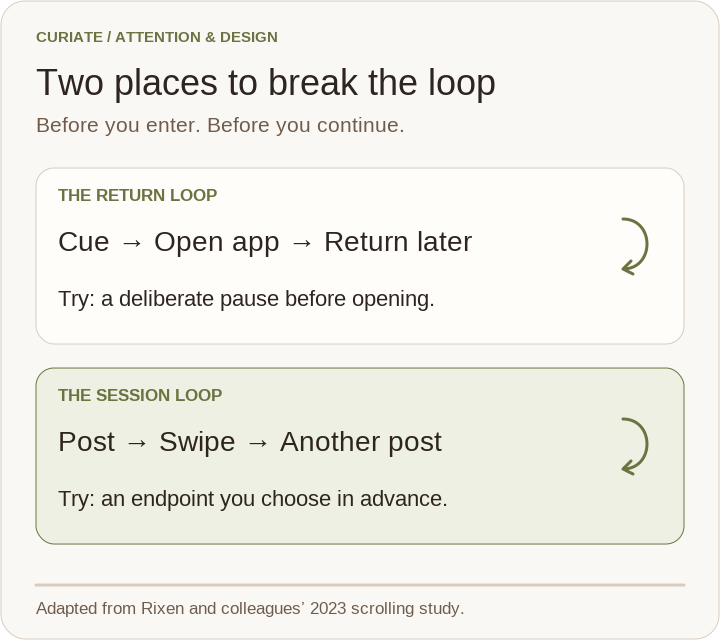
Human-computer interaction researcher Jan Ole Rixen and colleagues tracked 46 Android users for a week, recording 6,605 social-media sessions and collecting reports about why sessions ended. They distinguished an outer loop of returning to an app from an inner loop of continuing within it. Most reasons for leaving came from circumstances outside the app. This was a field study, not a randomized test of infinite scroll against pagination. Read the study.
That distinction gives you two places to intervene. If you open an app whenever a task becomes difficult, change the route into it. If you enter for a useful purpose but keep browsing afterward, decide how the session will end.
2. Rewards can shape behavior—but “dopamine hit” explains too little
An amusing clip, useful idea or reply can give you a reason to return. The possibility of another worthwhile item can make continuing attractive even when the current item is dull.
There is evidence for reward learning on social media. Psychologist Björn Lindström and colleagues analyzed more than a million posts from over 4,000 people and ran an experiment with 176 participants. Social rewards influenced posting behavior. Crucially, the study examined posting and likes, rather than directly measuring the reward from each swipe. It also did not measure dopamine. Read the study.
Classic neuroscience work (Schultz, Dayan and Montague, 1997) connected dopamine-neuron activity in primates with differences between expected and received rewards—a signal relevant to learning. That is more specific than treating dopamine as a pleasure button. It does not establish a measurable “hit” from every post in your feed. Read the foundational research review.
The slot-machine analogy captures uncertainty about what comes next. It is an analogy, rather than proof that every feed follows an identical reinforcement schedule or has the effects of gambling.
3. The next item is selected, not simply random
TikTok's 2020 explanation of its For You system identified signals including likes, shares and video information, with finishing a longer video described as a strong indicator of interest. This is a historical description, not a specification of today's exact algorithm. Read TikTok's explanation.
Personalization can help you find genuinely valuable material. It also means you are browsing a sequence selected using clues about what holds your interest. Watching something through does not necessarily mean you wanted to spend your evening on it. Predicting interest and respecting a reader's stopping intention are different design tasks.
4. Absorption can make the session hard to notice
Researcher Amanda Baughan and colleagues studied 43 people using a custom Twitter client for a month. Participants described experiences of becoming absorbed and losing awareness of their activity; some found the break beneficial, while others regretted it. Design changes including lists, reading-history labels and time prompts reduced self-reported normative dissociation: ordinary absorption with reduced self-awareness. This was not a diagnosis of a dissociative disorder. Read the paper.
The familiar surprise of looking at the clock has several possible contributors. Enjoyment, automatic checking, a lack of visible endpoints and reduced self-monitoring can overlap.
What actually helps interrupt the scroll?
Adding friction can change how people engage, although it has trade-offs. In a 30-student experiment, Nicolas Ruiz and colleagues compared an infinite feed with an interface requiring reactions before proceeding. The reaction-based group recognized more previously seen posts but took longer to get through the same posts, and over half found the requirement frustrating. Better memory came with more time spent, not less. Read the experiment.
For your own routine, choose an interruption that addresses the problem you notice:
| When you get stuck | A practical change to try |
|---|---|
| Opening the app without a purpose | Remove its home-screen shortcut or add a deliberate pause before entry |
| Browsing after answering a message | Decide in advance to leave when that task is done |
| Waiting for the feed to run out | Set an endpoint outside the feed: a timer or the end of a short list |
| Opening it every time you feel bored | Put another inviting activity within reach, including an offline break |
| Looking for something worth learning | Choose one article or learning path before browsing for more |
These are suggestions to test, not a package proven to work for everyone. Notice both how often you enter and whether you can leave when you intended. You may need a different adjustment for each.
A feed can have an ending
Curiate is our app. We built its discovery feed with a bottom: you receive a finite set and choose whether to request more. Its microlessons lead into original articles, videos and related books, giving curiosity a direction beyond another swipe.
Premium's Focus Time rewards eligible time spent reading or viewing those sources, with topic progress and a daily goal. On the web, credit uses time away and return; the iOS reader counts active reading and pauses after a minute without scrolling or touching. Neither verifies comprehension. The aim is to make time spent following a source visible, rather than reward only moving through cards.
Our guide to alternatives to doomscrolling compares other ways to change the activity. You can also browse Curiate's curations and choose a topic to explore. A useful endpoint is something you can name before you begin: one question answered, one article read, or simply a break that ends when you wanted it to.
Frequently asked questions
Did Aza Raskin invent infinite scroll?
Raskin says he invented his version in 2006. Microsoft's image-search team also documents early work, including a patent application filed in February 2006. The historical record supports a more qualified account than a single inventor creating every version.
Does infinite scrolling release dopamine?
Dopamine is involved in reward learning, but the social-media reward study discussed here measured behavior, not dopamine release during scrolling. Claims that every swipe delivers a fixed chemical “hit” go beyond that evidence.